
Best Outlook Email Signature Generator for Business & Personal Emails
Create a polished Outlook Email Signature in minutes using our simple Outlook Signature Generator and modern Outlook Signature Templates.
Trusted by 40K+ professionals at 1,200+ companies



Email Signature for Personal & Team Use
PERSONAL
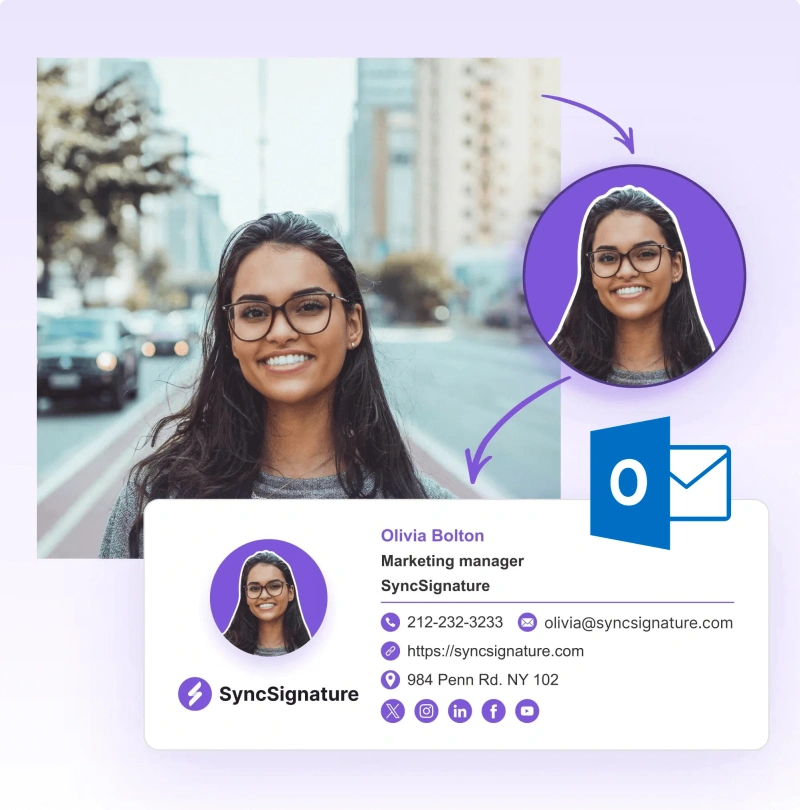
Professional Outlook Signature Generator With 100+ Templates
FOR TEAMS
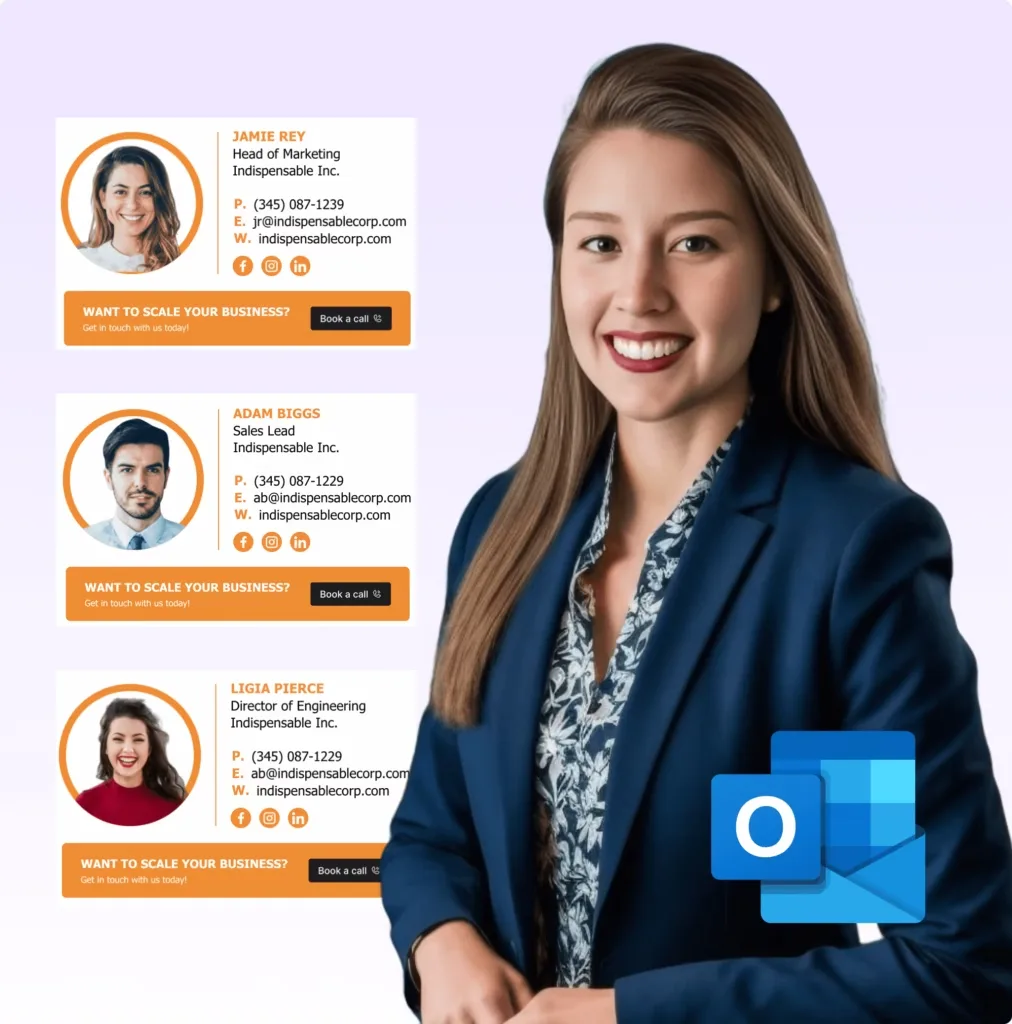
Outlook Signature Generator for Companies & Teams

Create a Custom Outlook Signature in 3 Simple Steps
Create a professional Outlook Signature in minutes with SyncSignature. Use our Outlook Signature Generator to design a clean Outlook Email Signature with ready-made Outlook Signature Templates. No technical skills needed.
Choose Your Outlook Signature Template
Select from our library of professionally designed Outlook Signature Templates. From modern to traditional, each template is fully customizable and optimized for all devices, including outlook desktop, web, iPhone, and Android.
Customize Your Information
Use our intuitive Outlook Signature Maker to add your name, title, company, phone, email, logo, and social media links. Drag-and-drop customization ensures your Outlook Email Signature looks polished without any design experience.
Install Instantly on your Outlook
Install your signature on Outlook Desktop (Windows & Mac), Outlook Web (OWA / Outlook.com), or Outlook Mobile (iOS & Android). On Desktop, go to File → Options → Mail → Signatures, click New, paste your SyncSignature HTML code, and set it as your default. On Web, go to Settings → Mail → Compose and reply, paste your code into the signature field, and enable automatic insertion. On Mobile, tap your profile icon → Settings → Signature and enter your text. Full step-by-step guides for every platform are included.
Choose Your Outlook Signature Template
Select from our library of professionally designed Outlook Signature Templates. From modern to traditional, each template is fully customizable and optimized for all devices, including outlook desktop, web, iPhone, and Android.
Customize Your Information
Use our intuitive Outlook Signature Maker to add your name, title, company, phone, email, logo, and social media links. Drag-and-drop customization ensures your Outlook Email Signature looks polished without any design experience.
Install Instantly on your Outlook
Install your signature on Outlook Desktop (Windows & Mac), Outlook Web (OWA / Outlook.com), or Outlook Mobile (iOS & Android). On Desktop, go to File → Options → Mail → Signatures, click New, paste your SyncSignature HTML code, and set it as your default. On Web, go to Settings → Mail → Compose and reply, paste your code into the signature field, and enable automatic insertion. On Mobile, tap your profile icon → Settings → Signature and enter your text. Full step-by-step guides for every platform are included.
Key Features of Our Outlook Signature Generator
Free & Paid Plans Available
Professional Templates
Access 100+ pre designed Outlook Signature Templates, suitable for corporate, creative, and industry-specific needs. All templates are optimized for perfect visibility across Outlook Desktop, Outlook Web, iPhone, and Android.
Complete Customization Options
Advanced customization helps you create a signature that aligns with your brand. Add social icons, banners, or disclaimers effortlessly using our Outlook Signature Maker.
Dynamic Content Support
Insert automatically updating information like promotional banners, event announcements, or seasonal campaigns. Change your message across all team signatures with a single update.
Legal Compliance
Include required disclaimers, confidentiality notices, and regulatory information. Our best Outlook Signature Generator provides pre-built compliance templates for industries like finance, healthcare, and legal services.
Mobile Responsive Design
All Outlook Email Signatures are fully mobile responsive, ensuring a professional look on iPhone, Android, tablet, and desktop.
Real Time Updates
Update contact info, banners, or logos and push changes across all team signatures instantly with the Outlook Signature Generator for Teams.
Team Management Dashboard
Centralized control lets you update signatures across your team instantly. Maintain brand consistency, assign templates to departments, and track signature performance.
Integration & Compatibility
Works with Outlook 365, 2019, 2016, Outlook for Windows, Mac, and other email clients. Your Outlook Signature always displays correctly, ensuring professionalism everywhere.
Modern & Responsive Outlook Email Signature Templates

Corporate & Professional Templates
Minimalist and clean designs that convey trust and authority across every Outlook email. Ideal for corporate teams and professionals who want a consistent, polished brand presence.

Creative & Artistic Templates
Vibrant designs tailored for creative industries to showcase personality while staying professional. Made for designers, agencies, and freelancers who want their emails to leave a lasting impact.

Sales & Marketing Templates
Conversion focused Outlook email signatures with CTAs, banners, and social proof. Turn everyday emails into marketing assets that drive engagement and leads.

Industry Specific Templates
Templates designed for healthcare, legal, and finance professionals with compliance ready layouts. Built to align with professional standards while keeping a business appropriate tone.

Always Fresh & Updated
New Outlook signature templates are added regularly to keep your email signatures modern. Stay aligned with evolving design trends and business needs effortlessly.

IT & Technology Templates
Clean, professional Outlook Email Signature templates crafted for IT firms, SaaS companies, and tech experts to highlight innovation, credibility, and modern branding.
Why We Are the Best Outlook Signature Generator
Outlook Signature Maker Quick & Simple
SyncSignature's Outlook signature generator simplifies email signature creation with intuitive drag-and-drop tools. Design professional Outlook email signatures in minutes without coding knowledge. Perfect for businesses seeking efficient signature solutions.
Premium Outlook Signature Templates
Access premium Outlook signature templates tailored for business professionals. SyncSignature's Outlook signature maker offers customizable designs that enhance brand consistency. Create stunning email signatures that leave lasting impressions effortlessly.
Seamless Integration Outlook Email Signature
SyncSignature ensures flawless Outlook signature integration across all devices and email clients. Our Outlook email signature generator delivers consistent branding with automatic synchronization. Save time while maintaining professional communication standards organization wide.

Email Signature Management For Google Workspace
Deploy professional email signatures across your entire Google Workspace organization. SyncSignature's email signature management software integrates directly with your Google Admin console - create signature templates, assign them to departments or individuals, and push updates without employees lifting a finger. Signatures sync automatically for new hires added to your directory.

Email Signature Management For Microsoft Office 365
Manage company-wide email signatures for Microsoft 365. SyncSignature connects with your Office 365 environment to deploy branded signatures. Control signatures centrally, enforce legal disclaimers, and update everyone's signature from one dashboard - no Outlook plugins required for your end users.
Complete Outlook Signature Setup & Management Guide
With our Outlook Signature Generator, creating a professional and branded Outlook email signature is fast, simple, and fully customizable.Whether you're an individual professional, a growing business, or a large organization, SyncSignature helps you design Outlook signatures that look consistent across desktop, web, iPhone, and Android devices.
1. How To Create Outlook Signature
Create a professional Outlook Signature in minutes using these steps:
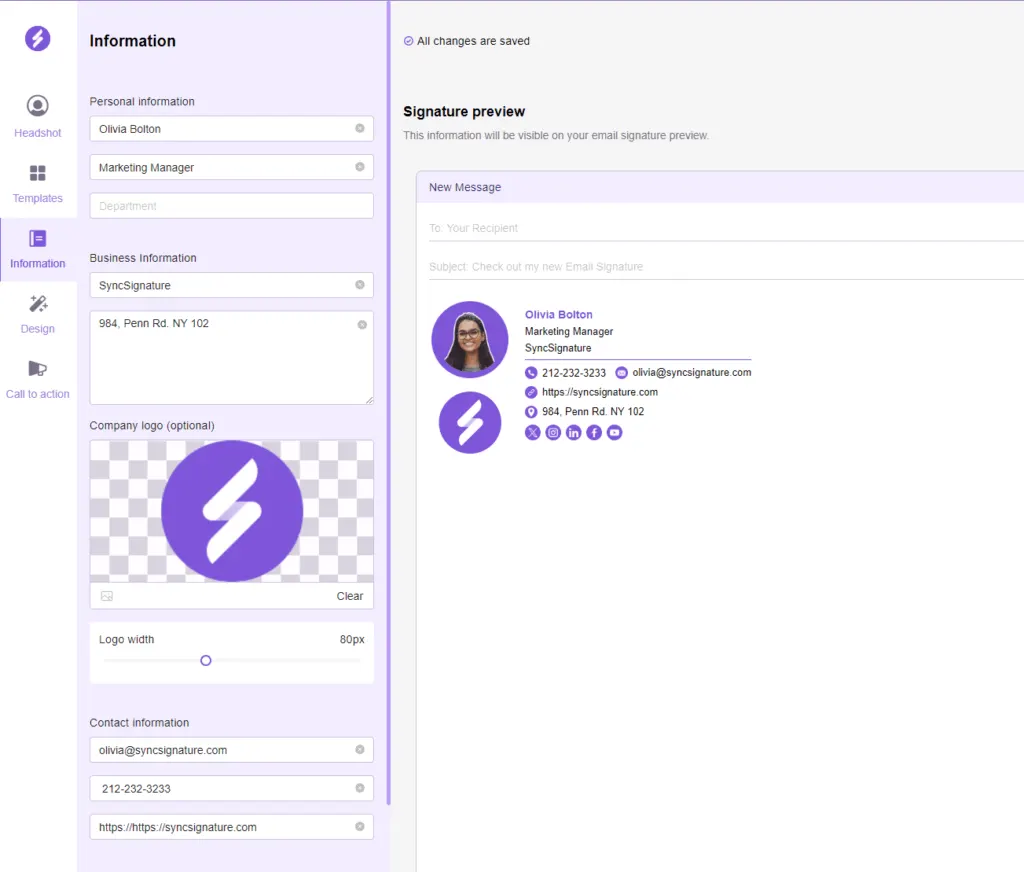
Signup and open Outlook Signature Generator on dashboard
Select Template
Enter Name, Title, Company, Email, Phone, Website etc.
Customize Fonts, Colors, Logo
Add Social Icons / Banners / Disclaimers
Preview and Generate
Copy/Paste Signature for Outlook Desktop / Web
Our Outlook email signature generator is designed to work seamlessly with Outlook Desktop and Outlook Web, ensuring your signature appears correctly on all screen sizes.
You can easily customize fonts, colors, logos, and layouts to match your brand identity while adding essential contact details, social media links, banners, and legal disclaimers.
No design or coding skills are required; everything is handled through an intuitive dashboard with real-time preview. Once generated, you can copy the HTML signature and paste it to Outlook in just a few clicks.
2. How To Add Outlook Signature
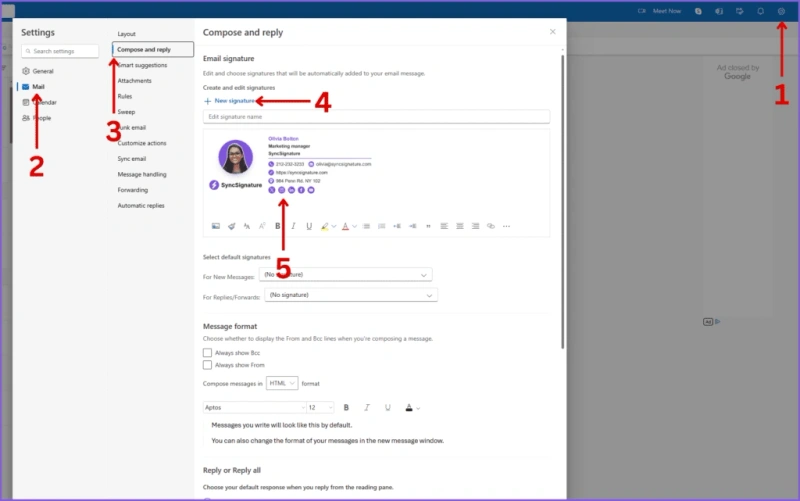
Add your Outlook Signature in Desktop/web with these steps:
Open Outlook Desktop
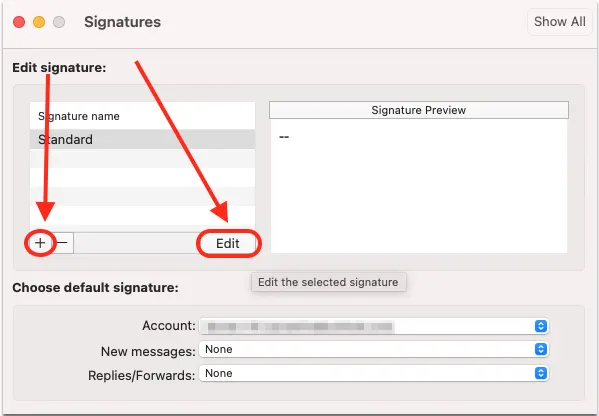
Go to File → Account Info → Account → Signatures
Click "New" and name your signature
Paste Signature from Outlook Signature Generator
Set signature for New Emails, Replies, or Both
For Outlook Web
Go to Settings → View all Outlook settings → Compose and reply
Paste Signature and configure appearance
Save and apply
Adding your Outlook signature on desktop or web is quick and straightforward with the Outlook Signature Generator.
Once your signature is created, simply copy and paste the signature into Outlook Desktop or Outlook Web to apply it instantly.
Set Up on Mobile App
Set up your Outlook signature on Desktop or Web first. Once configured, it will automatically appear in your mobile app, so there’s no need to set it up separately on your phone.
3. How To Change Outlook Signature In Outlook
Update your Outlook Signature instantly and easily using these steps:
Login to SyncSignature → My Signatures → Open saved signature
Edit contact info, job title, photo, or social links
Select a new Outlook Signature Template if redesign needed
Save your updated Signature and copy it
Open Outlook Desktop → File → Account Info → Account → Signatures
Paste updated signature
For Outlook Web → Compose and reply → Paste signature
For teams: Push updates to all members
Updating your Outlook Signature on desktop or web is simple and efficient.
Once generated, the new signature can be pasted in Outlook Desktop or Web ensuring consistency across devices.
For teams, enterprise features allow signature updates to be pushed instantly.
Modify on Mobile App
Change your Outlook signature on Desktop or Web first. Any updates you make will automatically sync to the Outlook mobile app, so there’s no need to edit the signature separately on your phone.
What Our Customers Say About SyncSignature





Professional Email Signatures Made Effortless!
I didn’t realize how messy my email signature looked until I fixed it. SyncSignature helped me set up a clean, professional signature, and now every email I send looks consistent.

Chirag G.
Director - Strategy & Innovation
Great platform! saved us a ton of time!
I love how easy it is to create professional-looking email signatures with SyncSignature. The templates are modern and eye-catching, saving me lots of time. I also like that I can update everyone's signatures in my company at once.

Bratislava V.
Digital Marketer & Copywriter
Made our brand look consistent in every email!
Before this, everyone had slightly different formats and photos. Now every team member’s signature looks perfectly on-brand with logo, colors, CTAs, everything. The setup was super easy, and updates rolled out instantly to all users. It’s one of those small tools that quietly makes your brand look 10x more professional easily.

Anastasia Liamets
Senior Product Marketing Manager
Standard email signatures for our entire company within minutes
I created account, connected my team using Google Workspace and created a beautiful template for our company through which all signatures are created in a jiffy and installed on everyone’s account automatically.

Sara L.
Growth Analyst
Easily integrates with Google Workspace
I got it thinking about enhancing my value proposition to some customers, but I started using it for myself and I love it. I use Google Workspace and so far so good, easy to use, good templates, good customization, 100% recommended.

Sergio Rey
Best email signature management software I found on the internet!
SyncSignature handles email signature creation and bulk updation from a single place for our Google Workspace users. Everything is automated and employees do not have to do anything.

Jinkal P.
Product designer
Frequently asked questions
Navigate to your signature options via File > Options > Mail > Signatures. In the "Choose default signature" section, select which signature should display automatically in fresh emails and responses. This removes the requirement to manually add your signature every time.
Keep your signature width between 600 pixels and height around 100-200 pixels. Images should be under 10KB, with the total signature size staying below 25KB to ensure fast loading and proper display across all devices.
Navigate to File > Options > Mail > Signatures, select the signature you want to modify from the list, make your edits using the formatting tools, and click Save. Your updated signature will appear in future emails immediately.
Use standard fonts like Arial add your company logo at appropriate dimensions, include relevant contact information, and incorporate brand colors sparingly. Tools like SyncSignature or an Outlook signature generator can help create polished designs quickly.
Create your signature using simple HTML formatting, avoid large images, test across desktop and mobile platforms, and keep the design responsive. Use an Outlook signature generator that creates mobile-friendly signatures automatically.
Yes! SyncSignature offers a generous free plan that includes access to numerous Outlook Signature Templates. You can create, customize, and use professional signatures without any cost.
Absolutely! Our Outlook Signature Maker allows you to create multiple signature profiles for different scenarios. You might want one Outlook Email Signature for internal communications, another for external clients, and a third for marketing campaigns.
Yes, every Outlook Email Signature created with SyncSignature is automatically optimized for mobile responsiveness.
Yes, our Outlook Signature Generator is fully compatible with Outlook 365, as well as Outlook 2019, Outlook 2016, Outlook for Mac, and Outlook web application.
Not at all! We've designed our Outlook Signature Generator to be intuitive for users of all technical skill levels. The drag-and-drop interface, pre-designed templates, and guided customization process make it easy for anyone to create professional signatures. No coding, design experience, or technical expertise is necessary. If you can type your information into form fields, you can create a stunning Outlook Email Signature with SyncSignature.
SyncSignature generates the HTML signature code for you , you don't need to write any HTML yourself. On Outlook Desktop, go to File → Options → Mail → Signatures, click New, name your signature, and paste the HTML code from SyncSignature into the editing box. On Outlook Web, go to Settings → Mail → Compose and reply, click the signature field, and paste the code there. HTML signatures allow you to include formatted text, colors, images, logos, and branding that display correctly across Outlook Desktop, Web, and mobile devices. SyncSignature's visual editor handles all HTML formatting with a drag-and-drop interface.
Yes, absolutely. Outlook allows you to set separate default signatures for new messages and replies. This is useful if you want a full signature with logo and contact details for new emails, but a shorter signature for reply chains. In Outlook Desktop, go to File → Options → Mail → Signatures. You'll see two dropdown menus: 'New messages' and 'Replies and forwards'. Select a different signature for each setting, and Outlook will apply the appropriate one automatically. You can also have different signatures for different email accounts if your Outlook account has multiple identities.
Our how to add a signature in Outlook guide covers the complete process , from creating your signature in SyncSignature to installing it in Outlook Desktop, Outlook Web, and Outlook on mobile.
Outlook email signatures by role
Templates built for your specific profession , not just your email client.
Executive templates for CEOs, founders & C-suite leaders
View templatesProfessional templates for educators and school staff
View templatesBuild credibility and make the right impression as a student
View templatesTrust-building templates for real estate agents and brokers
View templatesCreate Professional Outlook Email Signature for Free
Transform every email into an opportunity. Build trust, drive conversions, and maintain brand consistency across all communications. Your perfect Outlook Email Signature is just minutes away with SyncSignature's powerful Outlook Signature Generator.