
The best Canva email signature alternative, because a signature is not a graphic
Canva is excellent at design and cannot export a signature as HTML. Its own help documentation says so. That means a Canva signature leaves as an image: the phone number and links inside it are not clickable, and screen readers cannot read the text inside it.
SyncSignature builds real HTML signatures with live links and installs them across Google Workspace and Microsoft 365 in minutes. Teams is $15 a month for up to 5 users, then $2 per user per month in bands of five from 6 users, billed annually.
Works with Gmail, Outlook, Apple Mail & More


Why choose SyncSignature over Canva for email signatures
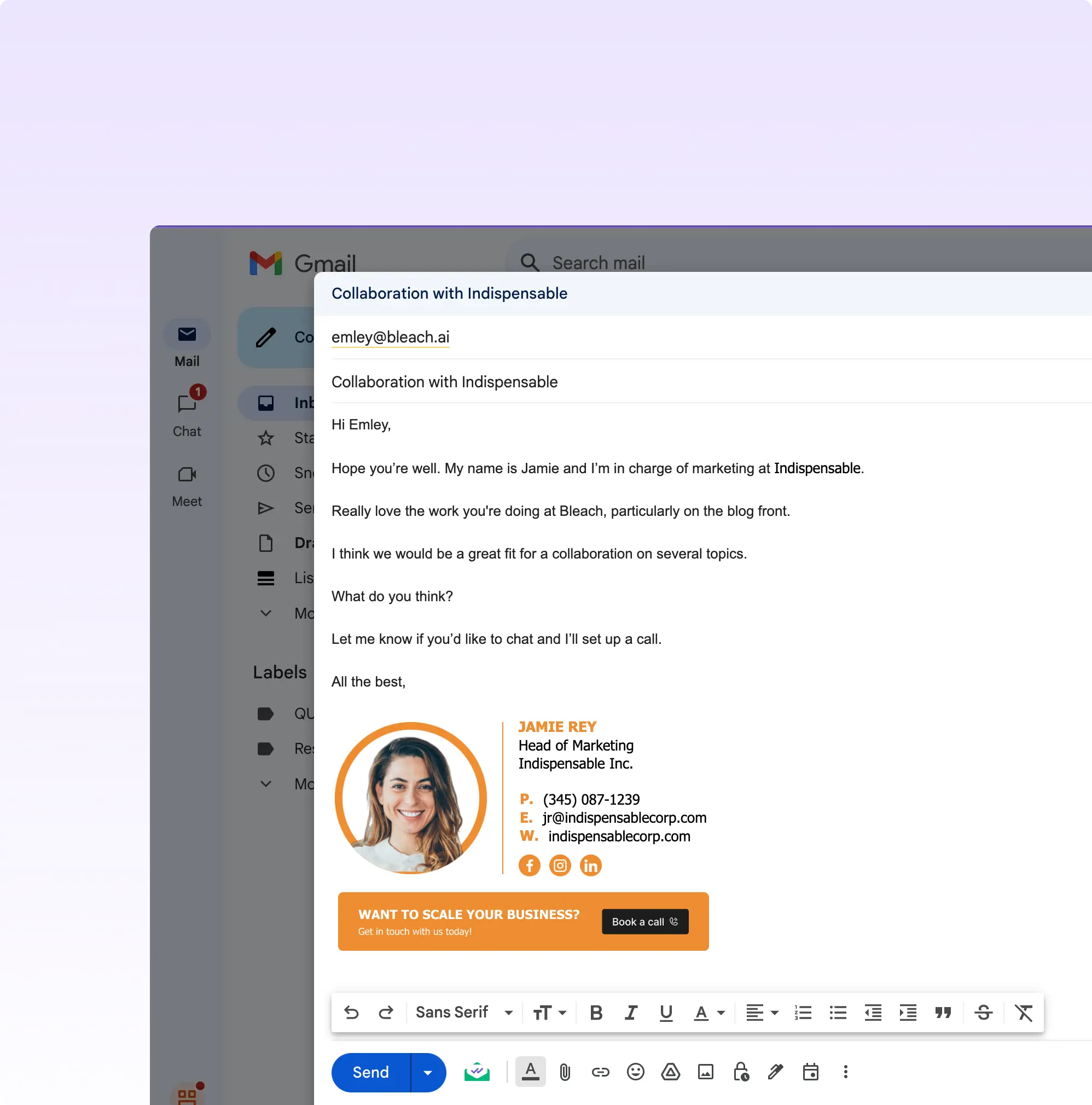
Real HTML, Not An Image
Canva's help documentation states that HTML export is not yet available for signature designs. Canva Email exports HTML, but that is the campaign product, not the signature editor. So a Canva signature is a picture of a signature: the text and links inside it are not clickable or selectable. SyncSignature outputs live HTML with working links.
Built for Email, Not Graphics
SyncSignature is purpose-built for email signatures, not a generic design canvas. Every template, editor, and workflow is optimized for professional email use, so you get results in minutes without wrestling with a general-purpose design tool.
One-Click Team Deployment
Push signatures to every inbox on your team without asking employees to copy-paste anything. SyncSignature integrates directly with Google Workspace and Microsoft 365 to install signatures automatically, eliminating the manual steps Canva requires.
Built-in AI Headshots
Transform ordinary profile photos into polished, professional headshots directly inside SyncSignature. No need to use a separate tool: generate consistent headshots for your entire team and embed them into signatures automatically.
Signature Analytics
Track clicks, banner impressions, and CTA performance for every signature across your team. Canva has no concept of email signature analytics; SyncSignature turns your team's emails into a measurable marketing channel.
Multi-Workspace Agency Support
Manage multiple brands or clients from a single dashboard with dedicated workspaces. Canva's sharing model was designed for design assets, not for agencies managing signature campaigns across dozens of clients.
Self-Hosted Brand Assets
Logos and profile pictures are hosted on our infrastructure so they render reliably. A Canva signature is one uploaded image, so every change means re-exporting and re-uploading it for each person.
Canva vs SyncSignature: Which is better for email signatures?
Canva is a fantastic general-purpose design tool, but it was never designed to manage email signatures at scale. There is no team deployment, no analytics, no Google Workspace signature deployment, and no way to keep every employee's signature consistent without relying on copy-paste.
SyncSignature was built from the ground up as a dedicated email signature platform. It handles everything from design to deployment to measurement, making it the clear choice for professionals, growing teams, and agencies looking for a reliable Canva email signature alternative.
SyncSignature vs Canva: Feature Comparison
| Feature | SyncSignature | Canva Email Signature |
|---|---|---|
| Purpose-built for email signatures | ||
| Google Workspace / M365 integration | ||
| Team deployment (no copy-paste) | ||
| Email signature analytics | Click tracking & banner impressions | |
| AI headshot tool | ||
| Number of templates | 100+ email-optimized | Email signature template gallery (image output) |
| Self-hosted brand assets | ||
| Per-client signature workspaces | Full, dedicated workspaces | |
| Free plan | Yes, 1 signature | Yes, but no signature deployment at any tier |
Consistent signatures across your entire team
With Canva, each employee has to manually copy their signature into their email client, and there's no way to enforce consistency. One rebrand means chasing down every single person.
SyncSignature centralizes signature management so one update propagates to every inbox on your team. No chasing, no inconsistency.

Professional templates with brand customization
SyncSignature automatically extracts your brand colors from your logo and applies them to 100+ professionally designed email signature templates in seconds.
Canva has signature templates, but each one is an image, so any change means re-exporting it and having every person paste it in again.
- 100+ email-optimized signature templates
- Automatic brand color extraction
- Renders correctly across Gmail, Outlook, Apple Mail, and more

Google Workspace & Microsoft 365 deployment
SyncSignature connects directly to Google Workspace and Microsoft 365 to push signatures to every employee's inbox, with no manual installation required from your team.
Canva has no integration that installs a signature in Gmail or Outlook. Every signature requires employees to paste in an image themselves, leading to inconsistent results and IT headaches.
How to move your Canva signature to SyncSignature
Most teams move at the point somebody notices the phone number in their signature is not tappable on a phone, or when a rebrand means asking everyone to re-export and re-paste. Total admin time: 20 to 40 minutes for teams under 100 people.
Screenshot your Canva design
You will rebuild rather than import, since there is no HTML to bring across. Capture the layout, fonts, colors, and field order, and export any banner artwork you want to keep as an image.
Connect Google Workspace or Microsoft 365
Google Workspace: one admin auth on the Gmail API. Microsoft 365: approve the SyncSignature Outlook add-in once via Centralized Deployment, and Microsoft propagates it to every user within 6 to 12 hours. Canva has no equivalent step because it has no deployment.
Rebuild as HTML and re-attach the banner
Match the Canva layout with a SyncSignature template so contact details become live, clickable text, then drop the Canva banner image back in as a banner. You keep the artwork and gain working links.
Publish and remove the pasted images
Verify on a few mailboxes, publish to everyone, and have employees clear the Canva image they pasted in. SyncSignature applies the new signature at compose time from then on.
What Our Customers Say About SyncSignature





Professional Email Signatures Made Effortless!
I didn’t realize how messy my email signature looked until I fixed it. SyncSignature helped me set up a clean, professional signature, and now every email I send looks consistent.

Chirag G.
Director - Strategy & Innovation
Great platform! saved us a ton of time!
I love how easy it is to create professional-looking email signatures with SyncSignature. The templates are modern and eye-catching, saving me lots of time. I also like that I can update everyone's signatures in my company at once.

Bratislava V.
Digital Marketer & Copywriter
Made our brand look consistent in every email!
Before this, everyone had slightly different formats and photos. Now every team member’s signature looks perfectly on-brand with logo, colors, CTAs, everything. The setup was super easy, and updates rolled out instantly to all users. It’s one of those small tools that quietly makes your brand look 10x more professional easily.

Anastasia Liamets
Senior Product Marketing Manager
Standard email signatures for our entire company within minutes
I created account, connected my team using Google Workspace and created a beautiful template for our company through which all signatures are created in a jiffy and installed on everyone’s account automatically.

Sara L.
Growth Analyst
Easily integrates with Google Workspace
I got it thinking about enhancing my value proposition to some customers, but I started using it for myself and I love it. I use Google Workspace and so far so good, easy to use, good templates, good customization, 100% recommended.

Sergio Rey
Best email signature management software I found on the internet!
SyncSignature handles email signature creation and bulk updation from a single place for our Google Workspace users. Everything is automated and employees do not have to do anything.

Jinkal P.
Product designer
The most powerful email signature creator trusted by 40,000+ professionals across 1,200+ businesses



When Canva is the right call
Canva is a better design tool than we are. There is a case where that is the deciding factor.
You want a highly custom visual design and will accept an image signature
Canva's editor will do things ours will not: bespoke illustration, unusual layouts, precise typographic control. If you want a one-off signature that looks like nothing else and you genuinely do not mind it being an image whose text and links are not clickable, Canva is the better canvas. Design it there and be aware of the trade-off rather than surprised by it.
You need the signature banner artwork, not the signature itself
Plenty of teams use both. Design the promotional banner in Canva, export it as an image, and drop it into a SyncSignature template where the surrounding contact details stay as live HTML. That gets you Canva's design range on the part that is meant to be a picture, and working links on the part that is not.
Frequently asked questions
You can design one, but you cannot export it as HTML. Canva's own help documentation states that exporting as HTML is not yet available in Canva for signature designs. Canva Email, its campaign product, does export HTML, but that is a different tool and not what you use to build a signature. So a Canva signature ships as an image, which means the phone numbers and links inside it are not clickable, screen readers cannot read the text inside it. You then install that image manually in each employee's client. Canva has no way to install or update a signature in anyone's mailbox, no deployment integration with Google Workspace or Microsoft 365, and no signature analytics. Its team features share designs, but they cannot control what each person pastes into their mail client. SyncSignature produces live HTML signatures and installs them automatically.
SyncSignature, because the gap is not design quality, it is output format and deployment. Canva cannot export a signature as HTML, so its output is an image whose text and links are not clickable, and it has no way to install a signature into anyone's mailbox. SyncSignature produces live HTML and deploys to Google Workspace and Microsoft 365, with 100+ email-optimized templates, AI headshots, signature analytics, and multi-workspace support for agencies. Many teams keep using Canva for the banner artwork inside the signature, which is a sensible split.
There is a free plan covering one signature with unlimited edits, the profile picture and headshot tool, social icons, and copy-paste install, with no credit card. Multiple signatures, the 100+ template library, signature analytics, and Google Workspace or Microsoft 365 deployment are on Teams, which is $15 a month for up to 5 users, then $2 per user per month in bands of five from 6 users, billed annually. A $6 a month Solo plan covers one person with copy-and-paste install.
SyncSignature integrates directly with Google Workspace and Microsoft 365. Once connected, you can push any signature to any employee's inbox from your dashboard, with no action required from the employee. Canva has no equivalent capability.
Canva exports a signature design as an image, not as HTML: its help documentation says HTML export is not yet available for signatures, and the HTML export in Canva Email applies to campaigns rather than signature designs. It also does not integrate with Gmail, Google Workspace, or Microsoft 365 for deployment, so each employee pastes the image in themselves, which leads to inconsistency and support burden. SyncSignature generates real HTML signatures with clickable links and installs them automatically via native integrations.
A Canva signature is a static image: text and links inside it are not clickable, and every change means re-exporting and re-pasting it in each person's mail client. SyncSignature hosts logos, headshots, and banners on our own infrastructure and keeps contact details as live HTML text.
SyncSignature is the top-rated Canva email signature alternative for teams. Other dedicated email signature tools include WiseStamp, Exclaimer, and Newoldstamp. Some of them cost less per seat; SyncSignature's case is automatic deployment to Google Workspace and Microsoft 365 with every feature on one plan.
Yes. SyncSignature offers dedicated multi-workspace support so agencies can manage signatures for multiple clients from one dashboard, with separate branding, templates, and deployment settings per client. Canva has no equivalent agency workflow for email signatures.
Comparing more than one tool?
Canva Email Signature is rarely the only name on the shortlist. You can compare all email signature alternatives in a single table, with entry pricing, seat minimums, and deployment model lined up side by side.
Stop building email signatures in Canva.
SyncSignature deploys professional, on-brand email signatures across your entire team in minutes, with no copy-pasting, no broken images, and no chasing down employees.