
Email signature directory sync for Google Workspace and Microsoft 365
Pull employee names, titles, departments, photos, and group membership straight from your directory. Push them into every signature. No CSV uploads. No IT tickets. No mail rerouting.
What is email signature directory sync?
Email signature directory sync is the automated process of reading employee records from a corporate directory (Google Workspace or Microsoft 365) and writing the relevant fields — name, job title, department, phone, photo, and group membership — into each user's email signature without manual CSV exports or per-user editing. When a record changes in the directory, every signature that depends on it updates within minutes. Directory sync removes the human step that breaks at scale: spreadsheets, mail-merge templates, and IT tickets every time someone is hired, promoted, or rebranded.
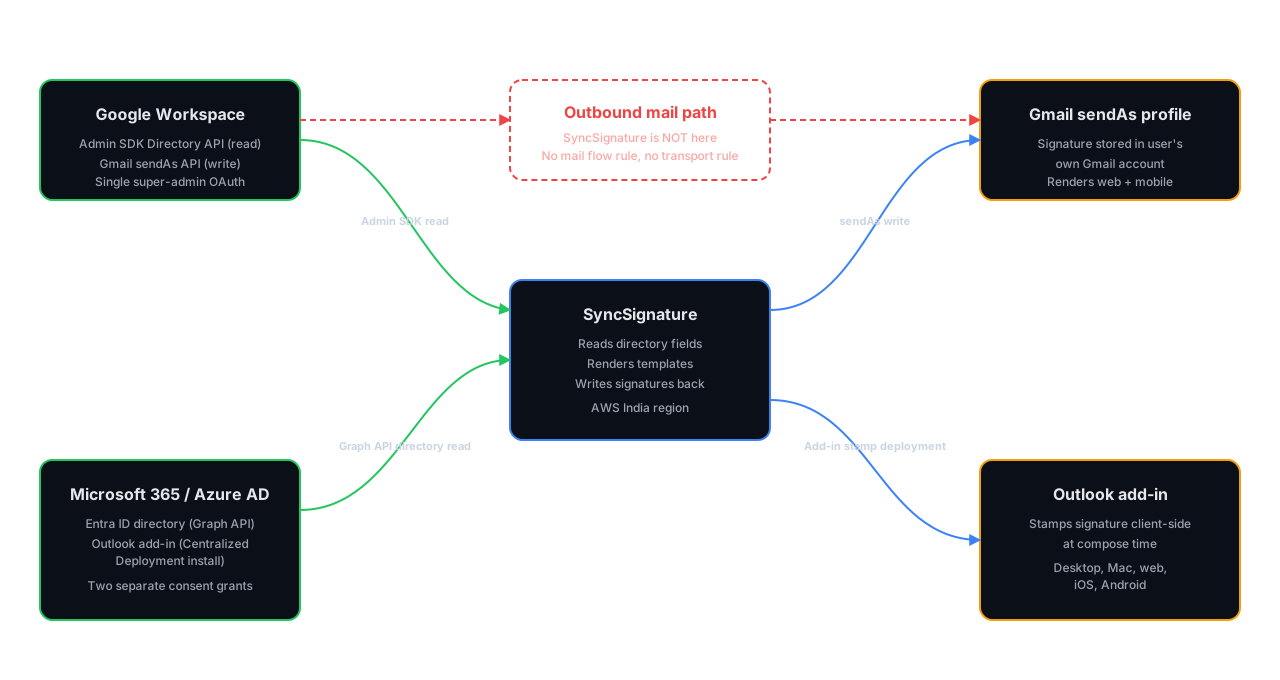
SyncSignature performs directory sync in two places. For Google Workspace, it reads the directory through the Gmail and Admin SDK APIs after a single super-admin authentication. For Microsoft 365, it reads Entra ID (formerly Azure AD) through the Outlook add-in installed via Microsoft 365 Centralized Deployment. In both cases, the sync is read-and-stamp, not migrate-and-host. Your directory remains the source of truth and your email content never leaves Google or Microsoft.
The most powerful email signature platform trusted by 30,000+ professionals across 1000+ businesses


Directory sync, compared
SyncSignature is the only approach that combines directory as source of truth, zero end-user install, and zero mail rerouting. Server-side stamping vendors hit the first two but break the third. Per-user installers hit the first and third but break the second.
| Capability | SyncSignature |
|---|---|
| Source of truth is your directory (no CSVs) | Yes |
| Zero end-user install | Yes |
| Zero mail rerouting (client-side stamping) | Yes |
| Google Workspace via Admin SDK + Gmail sendAs | Yes |
| Microsoft 365 / Azure AD via Microsoft Graph API + Outlook add-in | Yes |
| OU, group, and custom-attribute targeting | Yes |
| Continuous 5–10 minute propagation | Yes |
| Outlook desktop, web, and mobile coverage | Yes |
| Multi-workspace agency dashboard | Yes |
| Exchange transport rule / mail flow rule required | No |
| SCIM endpoint | No |
| Direct Okta directory integration | No |
Set up directory sync in under 30 minutes
Two paths, same outcome. Pick Google Workspace or Microsoft 365 and follow the matching steps below.
Authenticate the directory
Sign in to SyncSignature as a workspace admin. For Google Workspace, complete the OAuth consent for the Admin SDK Directory API and the Gmail sendAs scope. For Microsoft 365 / Azure AD (Entra ID), grant Microsoft Graph API directory read consent (User.Read.All, Group.Read.All, Directory.Read.All). This is the directory read connection — no mailbox content scopes are requested.
Approve the Outlook add-in (Microsoft 365 only)
Approve the SyncSignature Outlook add-in in the Microsoft 365 admin center via Centralized Deployment, targeting all users or a specific Entra ID group. This is the signature deployment connection, separate from the Graph API consent above. Google Workspace tenants skip this step entirely.
Wait for Microsoft propagation (Microsoft 365 only)
Microsoft pushes the add-in to every targeted Outlook install within 6 to 12 hours. This window is controlled by Microsoft, not SyncSignature. Directory data is already available immediately through Graph API — only the add-in side waits.
Pick the OUs or groups you want to manage
Stage the rollout starting with a single OU or Entra ID group, or include the entire tenant from day one. The SyncSignature dashboard handles GWS and M365 tenants side by side for parent organisations running both. Group membership comes from the Admin SDK or Graph API connection.
Build a template with merge tags
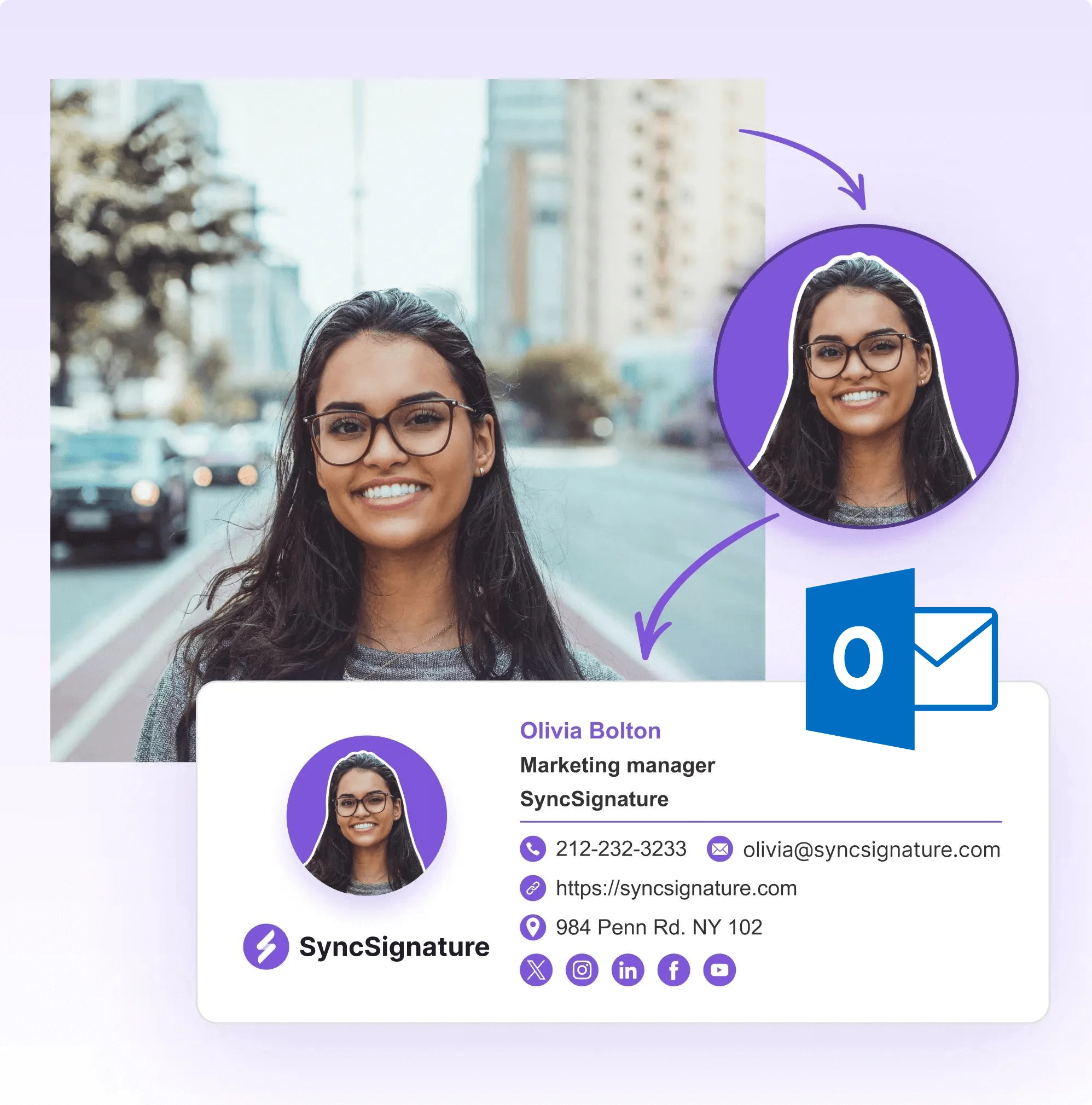
Use the drag-and-drop editor to design a template. Reference directory fields with merge tags such as {{name}}, {{title}}, {{department}}, {{phone}}, and {{photo}}. No HTML required.
Assign templates by group
Group templates can be scoped by OU, Google Group, Entra security group, M365 group, distribution list, department, or custom attribute. Sales and engineering can carry different layouts, banners, and CTAs from the same publish.
Publish
SyncSignature writes the rendered signature into Gmail sendAs profiles or stamps it client-side via the Outlook add-in using data read from Graph API. Propagation completes within 5 to 10 minutes. End users do nothing.
Why CSV uploads break at five employees and above
Manual signature management collapses on three predictable failures.
First, every new hire requires a copy-paste cycle: pull data from the HRIS, paste into a template, send to the user, hope they install it correctly.
Second, every role change, every promotion, every department shuffle leaves stale signatures in production for weeks because nobody owns the update.
Third, brand refreshes turn into multi-week projects because there is no single switch to flip.
Directory sync removes all three. The directory is already the system of record for who works at the company and what their title is. Any signature tool that cannot read it is asking the IT team to maintain a parallel database by hand.
Cost framing: a 50-person company that hires 1 person per month and refreshes signatures twice a year spends roughly 14 hours per year on signature admin under the manual model. That is one full FTE day per quarter, every quarter, forever. Directory sync collapses that cost to zero after the initial setup.

Google Workspace directory sync
A super-admin authenticates SyncSignature against the Google Workspace tenant once. SyncSignature reads the user list, organizational units, groups, and per-user profile fields through the Google Admin SDK Directory API and the Gmail API. Templates reference field names ({{name}}, {{title}}, {{department}}, {{phone}}, {{photo}}). When a template is published, SyncSignature writes the rendered signature directly into each user's Gmail “send mail as” profile. The signature renders client-side from inside the user's own Gmail account. SyncSignature never touches outbound mail.
Fields available from Google Workspace: full name, primary email, job title, department, work and mobile phone, office location, manager, profile photo, OU path, and Google Group memberships.
Targeting logic: group templates can be scoped by OU (/Sales, /Engineering/Mobile), by Google Group (marketing@yourcompany.com), or by custom attribute. A salesperson and an engineer can carry different layouts, different banners, and different CTAs from the same admin dashboard.
Sync cadence: continuous. Directory changes propagate within 5 to 10 minutes.
Deployment surface: Gmail web, Gmail mobile (iOS, Android), and any Gmail-connected client that respects the “send mail as” signature. No browser extension required for the end user.
Total setup time for a 100-user tenant: under 20 minutes. See full Google Workspace deployment details.

Microsoft 365 and Azure AD (Entra ID) directory sync
The two-component architecture (read this first): SyncSignature integrates with Microsoft 365 through two distinct mechanisms working in parallel. Component one is a Microsoft Graph API connection that reads employee records from Entra ID (formerly Azure AD). Component two is a lightweight Outlook add-in deployed through Microsoft 365 Centralized Deployment that installs and stamps the signatures inside each user's Outlook. Reading and writing are separated on purpose: directory reads happen server-side via Graph API for speed and consistency, signature stamping happens client-side via the add-in so email never leaves Microsoft.
Component 1 — Directory read via Microsoft Graph API: A Microsoft 365 global admin grants SyncSignature consent to read directory data through Microsoft Graph. SyncSignature uses the Graph User, Group, and DirectoryObject endpoints to read the user list, group memberships, and per-user profile fields from Entra ID. This is a server-to-server connection with read-only directory scopes (User.Read.All, Group.Read.All, Directory.Read.All). No mailbox content scopes are requested.
Component 2 — Signature deployment via Outlook add-in: The same Microsoft 365 global admin approves the SyncSignature Outlook add-in once through the Microsoft 365 admin center using Centralized Deployment. Microsoft 365 silently propagates the add-in to every targeted user's Outlook on desktop, web, and mobile within 6 to 12 hours. End users do not install anything, click anything, or see any prompt. At message compose time, the add-in injects the rendered signature client-side, inside the user's own Outlook session. The email never leaves Microsoft. SyncSignature never sees the message body or recipient list.
Why the split matters: directory reads need to be fast, complete, and survive across thousands of users without depending on whether each user has Outlook open. Signature stamping needs to be local to the user's compose window so outbound mail never gets rerouted through a third-party server. Server-side stamping vendors (Exclaimer, CodeTwo, Letsignit on certain plans) collapse both jobs into a single mail flow rule that routes every outbound message through their own cloud. That works, but it puts a third party inside the mail path and adds a privacy and compliance surface area. SyncSignature uses Graph API for the directory job and the add-in for the stamping job, and avoids the mail-path surface entirely.
What SyncSignature does NOT do on Microsoft 365: no Exchange mail flow rule, no Exchange transport rule, no connector that reroutes outbound mail, no MX changes, no server-side stamping. The add-in is the deployment mechanism for the signature itself. Graph API is the read path for the directory data. Both are required, both are honest about what they do.
Fields available from Entra ID via Graph API: display name, UPN / primary SMTP, job title, department, office location, mobile and business phone, manager, profile photo, security and M365 group memberships, distribution lists, and custom attributes (extensionAttribute1–extensionAttribute15).
Deployment surface: Outlook on Windows, Outlook on Mac, Outlook on the web (OWA), Outlook mobile on iOS and Android. All surfaces with the same add-in.
Total admin setup time for a 100-user tenant: under 30 minutes plus the Microsoft propagation window. See full Microsoft 365 deployment details.
What directory sync covers today
Covered:
• Google Workspace directory (Admin SDK Directory API + Gmail sendAs API)
• Microsoft 365 and Azure AD / Entra ID (Microsoft Graph API for directory reads + Outlook add-in for signature stamping, deployed via Microsoft 365 Centralized Deployment)
• Continuous read sync (5 to 10 minute propagation)
• OU, group, department, custom-attribute targeting
• Photo sync from Google account or Entra ID profile
• Manager, location, multi-phone fields
• Banner campaigns scoped by group
• Multi-tenant management for agencies and parent organisations running multiple workspaces
The dashboard shows which template a user is currently receiving. Different teams in the same tenant can carry different layouts, banners, and CTAs.

Pricing and trial
Directory sync is included on the Teams plan, which starts at $2 per user per month and scales down toward $1.40 per user per month at 100 users. There is no separate directory sync add-on.
• 5-seat minimum on Teams
• Annual billing
• 7-day free trial, no card required
See the Teams plan pricing for the full breakdown.

What Our Customers Say About SyncSignature





It makes managing email signatures for the whole team fast and centralized. I don't like chasing people to update their signature. Changes apply automatically. Integration with Google Workspace works without issues.

Alexander B.
Marketing Director
As someone managing multiple businesses using Google Workspaces for emails, having a comprehensive email signature management tool is essential, and SyncSignature has already proven to be the ideal solution.

Christophe
Founder - AI services
What directory sync does not cover (be honest with the buyer)
If any of these is a hard requirement, Exclaimer or CodeTwo are the right call. SyncSignature competes on speed, price, and the absence of mail rerouting — not on enterprise compliance surface area.
You need direct Okta directory integration
SyncSignature does not pull employee data directly from Okta. If your IdP is Okta but your mail is GWS or M365, sync still works because Okta provisions into those platforms first. If your mail platform is something else, directory sync is not available today.
You need a SCIM endpoint for user provisioning
SyncSignature does not expose a SCIM endpoint. User provisioning happens through native GWS or M365 group membership, which is read continuously. If SCIM is mandated by procurement, look elsewhere.
You need standalone SAML SSO for the admin dashboard
Workspace admin authentication is Google or Microsoft OAuth today. Standalone SAML is not on the current product. Most teams are fine with OAuth — but if your security policy requires SAML, this is a blocker.
You need a native HRIS connector (BambooHR, Workday, Rippling, ADP, Gusto)
No native HRIS integration. The pattern is HRIS provisions into GWS or M365, SyncSignature reads from there. End-to-end pipeline works, the connector layer just lives in your IdP, not SyncSignature.
You run on-premise Exchange
Not supported. SyncSignature is Microsoft 365 only on the Outlook side. On-prem Exchange tenants need a server-side stamping vendor.
You need exportable admin audit logs for compliance
Admin action logging is not exposed to customers today. If SOC 2 auditors need to pull a log of every template change, this is not the right tool yet.
Frequently asked questions
No. SyncSignature is client-side only. Signatures are written into the user's Gmail sendAs profile (Google Workspace) or injected at compose time by the Outlook add-in (Microsoft 365). Email content never passes through SyncSignature infrastructure.
5 to 10 minutes for the SyncSignature side of the sync. The total propagation depends on how fast your directory itself updates. Google Workspace directory updates are near-instant. Entra ID changes can take a few minutes to settle in Microsoft's own systems before SyncSignature reads them.
No. For Google Workspace, the signature is written into their Gmail profile and appears the next time they compose. For Microsoft 365, the Outlook add-in is propagated to their Outlook through Microsoft 365 Centralized Deployment, which is silent and admin-driven.
Not directly. SyncSignature reads from Google Workspace and Microsoft 365 directories. If Okta is your identity provider but your mail is GWS or M365, you are fully covered because Okta provisions into those platforms and SyncSignature reads from there. If your mail platform is something other than GWS or M365, directory sync is not available today.
No. User membership comes from native Google Groups or Entra ID groups, which SyncSignature reads continuously. There is no SCIM endpoint to configure.
No. SyncSignature does not modify mail flow. The Outlook add-in stamps signatures client-side at compose time. There is no transport rule, no connector, no MX change, no mail rerouting.
Read access to the Admin SDK Directory API (user list, OUs, groups, profile fields) and write access to Gmail's sendAs resource for the users you choose to manage. SyncSignature does not request mailbox read or send scopes. It does not see message content.
Two consent grants. First, Microsoft Graph API directory read scopes (User.Read.All, Group.Read.All, Directory.Read.All) so SyncSignature can read employee records, group memberships, and profile fields from Entra ID. This is a server-to-server connection. Second, the SyncSignature Outlook add-in is approved through Microsoft 365 Centralized Deployment. The add-in requests the right to inject HTML into the Outlook compose window. Neither connection requests mailbox read, mailbox send, or mail flow scopes. SyncSignature does not see message content.
Both, for different jobs. Graph API reads user and group data from Entra ID (Azure AD) on the server side. The Outlook add-in installs the signature client-side at compose time inside each user's own Outlook session. The two components are deployed once and run in parallel. Graph API alone cannot install signatures into Outlook reliably across desktop, web, and mobile, and an add-in alone cannot read directory data fast enough at scale, which is why both are required.
Remove them from the targeted Google Group or Entra ID group, or deprovision them in your directory. Their signature stops updating at the next sync cycle. If they are deprovisioned from the directory entirely, SyncSignature drops them from the managed user list automatically.
Yes. Templates are scoped by OU, group, or custom attribute. A salesperson and an engineer in the same tenant can carry different layouts, different banners, and different CTAs. The dashboard shows which template a user is currently receiving.
Yes. Agency multi-workspace is supported on the Teams and Agency plans. A parent dashboard manages dedicated per-client workspaces with isolated templates and users. Common pattern: one agency running signatures for 20 client tenants from a single SyncSignature account.
AWS, India region. SyncSignature stores template definitions, group assignments, and the directory metadata required to render signatures. It does not store mailbox content.
Yes. Google Workspace signatures render anywhere Gmail's sendAs profile is respected, including Gmail iOS and Android. Microsoft 365 signatures render in Outlook for Windows, Mac, web (OWA), iOS, and Android, because the add-in propagates to all five surfaces through Centralized Deployment.
It is included on the Teams plan, which starts at $2 per user per month and scales down toward $1.40 per user per month at 100 users. There is no separate directory sync add-on. Teams plan minimum is 5 seats. Annual billing only. 7-day free trial, no card required.
Exclaimer is a server-side stamping vendor. Every outbound message is routed through Exclaimer's cloud to inject the signature. SyncSignature stamps client-side and never touches outbound mail. Exclaimer wins on enterprise compliance surface area (SOC 2, in-region hosting in multiple geographies). SyncSignature wins on price, setup speed, and the absence of mail rerouting. See the full Exclaimer comparison.
Stop maintaining signature spreadsheets
Connect Google Workspace or Microsoft 365 once. SyncSignature reads the directory you already maintain and updates every signature in your company within minutes. No CSVs. No IT tickets. No mail rerouting.